01
Create a secure profile
Firefighters maintain their emergency contacts and optional medical information in a private personal account.
 FDTag
FDTag
 Cloud-Based Fire Service Software
FDTag is a cloud-based software platform being developed to help fire departments manage personnel, improve accountability, and make critical information available when it matters most.
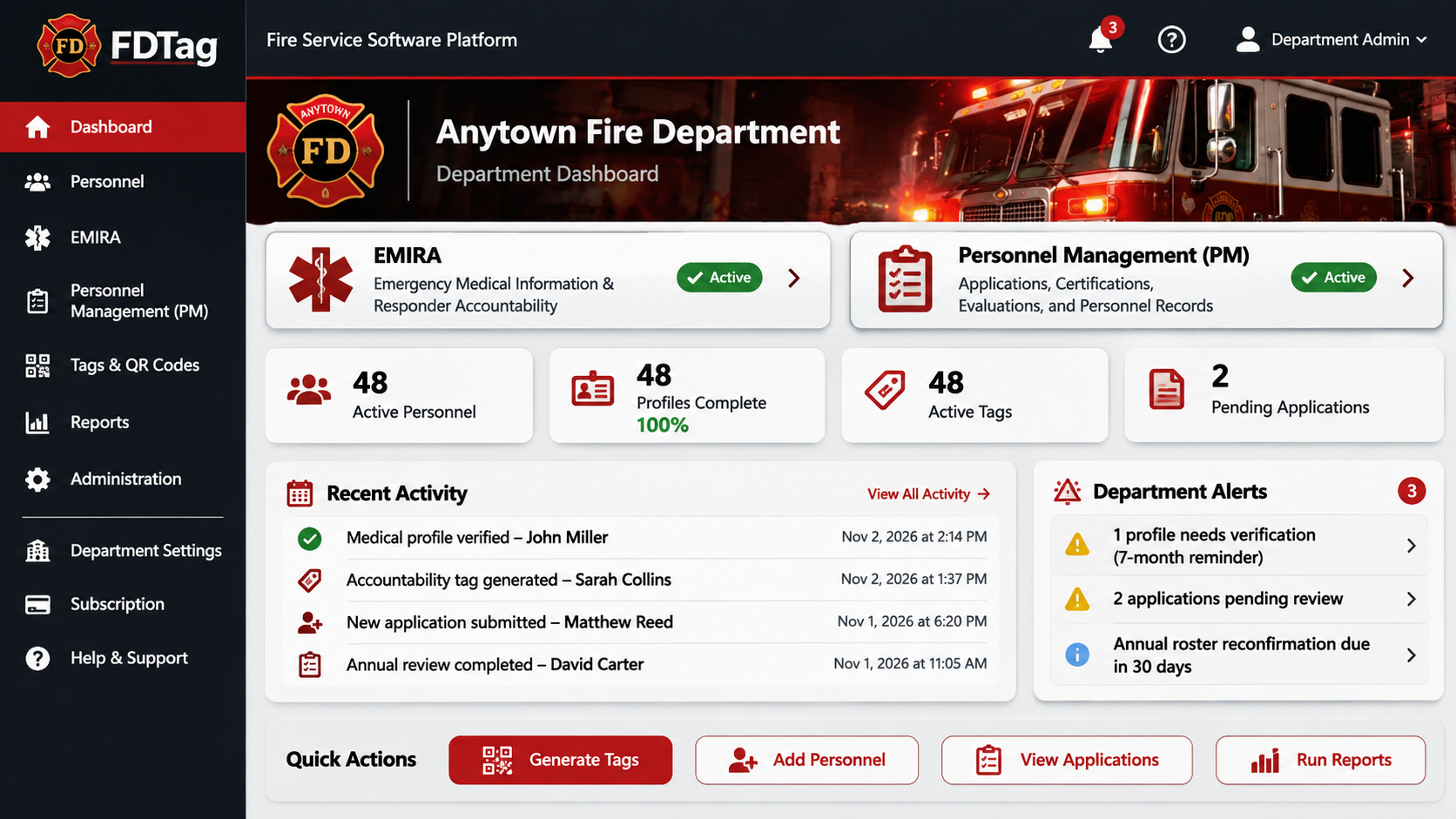
Our two independent modules focus on Emergency Medical Information & Responder Accountability (EMIRA) and Personnel Management (PM). Departments will be able to choose either module or both.
Affordable. Practical. Modular.
Coming Q2 2027
Get Early Access UpdatesIllustrative tag preview. Final designs may vary.
Start with the module your department needs, or use both through one shared dashboard. Each is designed to work independently, with room to grow.
A representative look at how FDTag could bring EMIRA and Personnel Management together in one department dashboard.
Critical information for authorized responders.
Connect accountability tags with securely managed emergency profiles. Planned tools include:
From a personal profile to an authorized emergency scan.
Firefighters maintain their emergency contacts and optional medical information in a private personal account.
Departments will generate identification tags with unique QR codes, or add QR stickers to existing accountability cards.
Authorized responders scan the code, sign in, and confirm an emergency purpose before protected information is available. Views are logged.
From application to active service, without the paperwork bottleneck.
Simplify the path from a prospective member’s first application to an approved personnel record. Instead of collecting paper forms, sorting email attachments, and repeatedly entering the same information, departments will be able to handle applications and personnel records in one place. Planned tools include:
Streamline applications, approvals, and ongoing records.
Department administrators configure personnel roles, stations, member access, and branded forms in a shared dashboard.
Applicants complete department-branded forms online. Authorized staff review submissions, follow up on missing details, and approve information for onboarding. Members can also submit certifications and other requested forms.
Keep rosters, evaluations, performance reviews, disciplinary records, qualifications, and archived personnel files organized with department-based permissions and activity history.
Flexible by design. Start with EMIRA, Personnel Management, or both. Neither module requires the other.
Scanning an FDTag QR code does not publicly reveal medical information. Protected details require authorized sign-in and confirmation of an emergency purpose.
Planned protections include encryption, role-based permissions, access logs, tag revocation, and secure backups. Firefighters control their medical profiles; department administrators do not automatically receive medical access.
Built for volunteer, combination, and career departments that need practical tools without extra complexity.
The emergency medical information and responder accountability module will support established accountability practices.
Maintain one personal account, even if you work or volunteer with multiple departments. Keep your private emergency information current and, where departments subscribe to Personnel Management, complete personnel forms and share personal information and certificates for department review. Each department will manage its own personnel records and permissions, while your private medical information remains separate.
FDTag is being developed by a firefighter with 25 years of volunteer service in a high-volume combination department, including service as its Fire Chief. That experience leading volunteer and career personnel in a demanding fire, rescue, and EMS environment shapes our approach to accountability, personnel management, and emergency information.
Our focus is practical tools that fit how fire departments actually operate.
FDTag is being built for volunteer, combination, and career fire departments of all sizes. We believe departments should have access to useful software without paying for features they do not need.
Both EMIRA (Emergency Medical Information & Responder Accountability) and Personnel Management will have their own subscription pricing tiers based on department size. Departments can subscribe to either module individually or choose both. Smaller departments will not be charged the same flat price as larger departments.
Specific subscription rates and introductory offers will be announced closer to launch.
No. FDTag is designed to supplement your department’s established accountability and incident command procedures, not replace them. Departments can also plan to use QR stickers with existing accountability cards.
Private medical details will not appear from a public QR scan. Access is planned for authenticated, authorized emergency responders with an emergency purpose. Firefighters maintain their own medical information; department administrators do not receive automatic medical access.
Yes. Emergency Medical Information & Responder Accountability and Personnel Management are planned as independent modules. Your department can select either one or both.
FDTag is targeting the second quarter of 2027. Join the interest list to receive product news and early subscription announcements. The date is a target and may change.
Get launch news and the opportunity to learn about introductory offers before FDTag becomes available.
FDTag is coming in Q2 2027. Register your department's interest today for launch updates, early-access announcements, and information about introductory subscription opportunities.
No obligation. No payment required. Just an opportunity to stay informed as FDTag develops. Registration does not guarantee early access or a discount.